Explainer: Introduction to technical triage of Android devices
This document is part of a technical documentation repository which has the main objective of establishing a baseline of proven, flexible and accessible knowledge to boost consensual forensic analysis in support of civil society across the globe. To organize the contents, we use the Diátaxis technical documentation framework. This particular resource fits within the explanation category in Diátaxis. It is complementary to other resources in this repository including how-to guides, tutorials and references.
This document provides an introduction to the technical triage of Android devices. It is a narrative document that provides insights into concept of triage, the interview that often happens in consented forensic analysis and some technical aspects on hwow Android devices are compromised, that an individual should know before engaging in the technical review of artifacts extracted from an Android device.
It is complementary to other resources, including:
- Explainer: Exploring the MVT tool for technical triage of Android devices
- Tutorial: Using MVT for technical triage of Android devices
- How-to: Technical triage of Android devices using MVT
- How-to: How to perform an extraction using AndroidQF?
What do we mean by technical triage of Android devices?
The concept of triage gets used to describe different parts of the DFIR process, so it's worth detailing what we mean by it in the context of this resource and repository.
In general, triage refers to a quick initial assessment used to decide whether a deeper investigation is required, and where to focus it. The term comes from medical triage: sort and prioritize, don't diagnose. For example, NIST SP 800-61r3 describes triage (in the context of validating incident reports) as a preliminary review to confirm that an incident has occurred and to gauge its severity and urgency, or a judgment call made before deeper investigation begins, not the investigation itself.
In the context of this resource and repository, we expand this definition of triage to cover two aspects:
- Non-technical triage: the interview, gathering of context and hypothesis formulation work that happens before any device is touched. This step shapes what the technical stage should actually look for, and is where consent considerations are addressed directly with the person requesting support.
- Technical review of artifacts: refers to using acquired information (bugreport, intrusion logs, AndroidQF extraction, etc.) to check it against known IOCs and suspicious patterns or behaviors (TTPs). Importantly, during this initial artifact review, you are looking for signs of potential malicious activity, so that you can decide if further manual analysis is necessary.
It’s worth differentiating this technical triage from a deeper forensic analysis, that usually happens through manual review and that can lead to the identification of previously undetected IOCs.
Therefore, in the context of this repository we define technical triage as the bounded, hypothesis-driven review of available device artifacts (bugreport, AndroidQF extraction, intrusion logs, etc.) to identify indicators of compromise or TTPs consistent with known attack vectors.
How to start investigating potential threats on Android devices?
Before conducting a technical triage, you should have access to key information about the case and the request. Understanding the context, timeline, and history of potential threats is crucial before you engage with any technical evidence. This can be the difference between trying to find a needle in a haystack and conducting a more intentional and narrow review driven by this hypothesis.
Depending on your role in the investigation, you might have a direct connection with the person requesting support, or you might be working through a partner on the ground. Either way, in consensual forensics, analysts generally have access to contextual information on potential threats, possible vectors, the person's threat history, and the broader context of the case. This is one of the key advantages of consensual forensics, when compared to more adversarial approaches used in other contexts.
Gathering context before the technical triage
Most of this information is collected during interviews and conversations when the case is first received. Keep in mind this information is only available as long as the person consents to share it.
Consider also that being the target of an spyware attack has impacts beyond the technical compromise. The Study on the Psychosocial Impacts of Spyware and the Guide for Psychosocial Accompaniments explores some of these consequences and provides guidance on how incident responders can incorporate practices that lead to more comprehensive and holistic accompaniment.
Preparing guiding questions and documentation can go a long way toward making sure you collect what you actually need. In general, you should come out of these conversations knowing:
- What happened?
- When did it happen? What's the timeline of events?
- How did it happen?
- What devices were involved?
- What actions have already been taken?
Document this information as soon as possible after the conversation, and make sure it's available for reference during the technical triage itself. It's easy to lose track of a detail mentioned in an intake call days or weeks after it happened.
What to do when there is no clear sign of compromise?
Sometimes people reach out asking for a preventative or routine check of their devices, with no specific indicator of malicious activity and no stated reason beyond their risk profile. This is a valid request, and it's still possible to conduct an acquisition and run automated checks against known IOCs. But it's worth being upfront about the limits of this review, since it will only surfaces known threats, and looking at an entire operating system for traces of malicious activity, with nothing to narrow the search, can be challenging and resource intensive.
How are Android devices compromised?
In general, regardless of the specific vulnerabilities exploited, attackers follow a similar process to compromise devices and extract the information stored and produced by them. We can describe this spyware kill chain as follows:
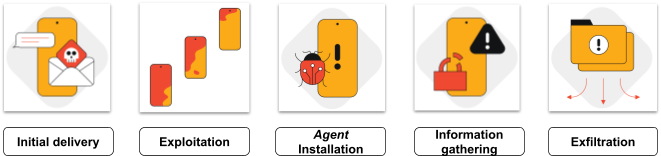
Image 1. Spyware kill chain. Adapted from Google Threat Analysis Group, Buying Spying: Insights into Commercial Surveillance Vendors.
The steps can be described as follows:
- Initial delivery: refers to the initial step conducted by an attacker, which can be the delivery of a phishing message for a 1-click attack, the trigger of a process through a 0-click vulnerability, or network interception to deliver a malicious package.
- Exploitation: in this phase, the package delivered initially is launched, which in turn exploit one or several vulnerabilities, that lead to remote code execution, sandbox escape or local privilege escalation.
- Installation: once the package is able to escape the application sandbox and gains sufficient privileges, it installs the spyware agent.
- Information gathering: during this phase, the attacker can collect information of interest, including messages, emails, browsing history, conversations through the microphone, and video or photos through the camera.
- Exfiltration: finally, information is exfiltrated from the device. For this, there is generally communication with a command and control (C2) server. This remote server can send commands and receive collected information.
In addition to understanding the steps attackers generally follow to compromise a device, it is helpful to look specifically at Android devices and the historic reports of compromises against civil society. Understanding the attacker's process, tactics and techniques can help develop a mental model of what traces to look at when exploring the evidence. Scanning for anything unusual can be a challenging exercise, especially if we are looking everywhere, at all dates, without clarity on which specific traces we might be after.
Below we describe a few different attack vectors that can be used to gain access to an Android device.
Account-level compromise (no device compromise)
Although this is a different type of incident, sometimes malicious behavior that someone suspects could be an infection of their devcice (for example data exfiltration) can actually be the result of a compromised account rather than a compromised device. Account compromise often results from unsafe security practices and configurations, like password reuse or lack of multi-factor authentication, but it can also result from advanced, targeted or state-sponsored attacks.
It is also worth mentioning that Google sometimes sends alerts when it detects attempts to compromise accounts from goverment backed attackers. Generally these warnings are related to account-level issues, and are not necesarilly an indication of an attempt to target a device.
Malicious APK (through physical proximity)
This doesn't require advanced device exploitation, since it happens when the attackers can physically manipulate the device to install an agent. State-sponsored actors have used this technique, as it was reported by Citizen Lab in 2024, in their report: Something to Remember Us By, that documents how spyware covertly implanted on a phone returned to a Russian programmer after he was released from custody.
Notably, Amnesty International's Investigation: A Digital Prison”: Surveillance and the suppression of civil society in Serbia documents the use of /NoviSpy a new spyware, installed while devices where in phsyical custoy of police, and that allows for capturing sensitive personal data from a target’s phone.
Vulnerability exploitation
These are usually highly targeted attacks, frequently state-sponsored, using a handful of vectors to install mercenary spyware on the device:
- 1-click: the target has to interact with something (a link, a message) for the exploit to run.
- 0-click: no interaction from the target is required at all.
- Network manipulaition: Attackers intercept or manipulate traffic to lead the victim to a malicious sites that can exploit vulnerabilities or redirect to downloads that infect the device.
- Targeted Advertisement: In 2026, the Citizen Lab report: Exposing AdFection revealed for the first time how targeted ads can be turned into a pipline for zero-click mercenary spyware.
Common Android artifacts
Common artifacts are the elements or traces that remain on a device after a malware infection. They are the raw material for conducting a technical triage. Checking these traces, one category at a time, against known indicators and suspicious patterns is part of the technical triage.
- Messages and links: are frequently the first step in an attack, used to get a target to click a link, open a file, or install an app.
- Browsing history: can reveal the sites a person visited or was redirected to as part of an attack, even after the initial link is gone from a messaging app.
- Applications: can be a direct traces of a compromise, since depending on the type of attack, a malicious agent might install itself as one.
- Permissions define what an application is actually allowed to do on a device, and a mismatch between an app's permissions and its stated purpose is a clear signal of misuse.
- General broadcast receivers let an application listen for system or application events, and reviewing them can help identify applications positioned to access sensitive information.
- Accessibility services exist to help users with disabilities interact with their device, for example by reading screen content aloud or performing actions on a user's behalf. That legitimate purpose requires broad capability that can be abused by malicious applications, including spywares and stalkerwares.
- Configurations: certain device settings, when disabled, remove protections that would otherwise flag or block malicious activity. Checking their state directly can reveal whether that protection was deliberately turned off.
- Rooting signals: Rooting removes many of the protections a stock Android device relies on. This might be the result of a user action, or also a malicious activity.
- Suspicious files: can beleft behind as a result of malicious activity. It can be different type of files, including malicious payload, data or logs.
- Crashes: can point to a failed exploitation attempt. Exploit chains are often fragile, and do not always work, resulting in application crashes. Because different parts of Android fail in different ways, the type of crash points to where in the system the attempt happened. A process crashing repeatedly, or crashing around a suspicious event, is worth investigating further.
Android artifacts reference table
Table 1. List of Android artifacts, their importance and availability
| Artifact | What to look for | Available in |
|---|---|---|
| Messages and links | Suspicious links; social engineering messages requesting information, access to a link, a file download, or installation of an APK | SMS backups, backups of unencrypted application databases, Google Takeout, manual review of messages |
| Browsing history | Suspicious links, redirects between sites, file downloads | Google Takeout (if browsing synchronization was enabled), browsing database via ADB (if the device is rooted), manual review within the browser (if not rooted) |
| Applications | Installed from suspicious sources, modified signatures or certificates, strange permissions, strange or random package names | Google Takeout via Google activity history, bugreport, ADB, AndroidQF |
| Permissions | Sensitive functions that do not match an application's stated purpose, such as camera, microphone, or location access | Bugreport, ADB, AndroidQF |
| General broadcast receivers | Applications registered to receive sensitive system or telephony broadcasts. Examples of suspicious ones include: android.provider.Telephony.NEW_OUTGOING_SMSandroid.provider.Telephony.SMS_RECEIVEDandroid.intent.action.DATA_SMS_RECEIVEDandroid.intent.action.PHONE_STATEandroid.intent.action.NEW_OUTGOING_CALL |
Bugreport, ADB, AndroidQF |
| Accessibility services | Applications with accessibility access that have no legitimate reason to need it | Bugreport, ADB, AndroidQF |
| Configurations | Settings that disable Google Play Protect, crash log reporting, or ADB install confirmation. For example: Related to Google Play Protect: verifier_verify_adb_installs, package_verifier_enable, package_verifier_user_consent (disables Google Play Protect), upload_apk_enable (disables Google Play Protect)Crash logs disabled: send_security_reports, samsung_errorlog_agree, send_action_app_errorConfirmation of application installation via ADB disabled: adb_install_need_confirm |
Bugreport, ADB, AndroidQF |
| Rooting signals | Rooting binaries or rooting applications installed on the device, for example: Binaries: su, busybox, magiskApplications: com.noshufou.android.su |
Bugreport, ADB, AndroidQF |
| Suspicious files | Files in unusual locations, or created, modified, or permissioned in ways that do not match normal use | Bugreport, ADB, AndroidQF |
| Crashes | Application, service, process, or kernel crashes that may point to a failed exploitation attempt | Bugreport, AndroidQF |
Tools for technical triage of Android devices
MVT
MVT (Mobile Verification Toolkit) is a tool to facilitate the consensual forensic analysis of Android and iOS devices, for the purpose of identifying traces of compromise. It was developed and released by the Amnesty International Security Lab in July 2021 in the context of the Pegasus Project, along with a technical forensic methodology. It continues to be maintained by Amnesty International and other contributors.
Conceptually, it works as a parser and comparator. It takes data collected from a device (via AndroidQF, a bugreport, or intrusion logs) and checks it against known indicators of compromise, while also making the parsed information itself easier to review. MVT output should be checked beyond the initial warnings, since the different files it creates include relevant information about the artifacts previously described. The MVT dictionaries available in the references section provide additional details about each of the files generated by MVT, and the complimentary resource Explainer: Technical triage using MVT expands further on the tool logic and usage.
Keep in mind that MVT is not intended to be an automated checker, running it does not, on its own, confirm or rule out compromise. It requires manual analysis and review of its output, but MVT can be very helpful in surfacing aspects worth investigating.
MVT Android modules
It's useful to know what modules are available for a given command, since which one applies depends on what data you have:
- mvt-android check-androidqf: allows analyzing an extraction performed with the AndroidQF tool using the modules for such extraction. These extractions generally also include a bugreport and, if available, the intrusion logs. Therefore, using the androidqf module may be sufficient to perform an analysis of all available artifacts, since MVT automatically detects these files and also runs the modules corresponding to bugreport and the modules corresponding to backup.
- mvt-android check-bugreport: allows direct analysis of a bugreport. If you don't have an AndroidQF extraction and want a quick analysis, it is recommended to use this module as a first step. If signs of suspicious activity are identified, it is recommended to complement this with the full analysis of an AndroidQF extraction.
- mvt-android check-intrusion-logs: intrusion logs are only available on devices with Android 16 or higher and when the person has previously activated Advanced Protection Mode with intrusion logging enabled. If you have an intrusion log file, it is possible to analyze this specific file using this command and MVT module.
Which command to use depends on what you have available. An AndroidQF extraction usually already includes a bugreport and, if collected, intrusion logs, so running check-androidqf against it will already analyze most of the acquired information in one pass, without needing to run the other commands separately.
ALEAPP
ALEAPP (Android Logs Events And Protobuf Parser) is a FOSS tool for parsing and analyzing Android logs, available as both a command-line and a GUI tool. Unlike MVT, ALEAPP isn't built around comparing artifacts to IOCs in order to detect spyware. It is a more general tool that helps reconstruct user activity that is later presented in a HTML report.
Note
In this repository we dive deeper into MVT specifically, since it's a community tool built around consensual analysis and is widely used across this space. That focus shouldn't discourage you from exploring other tools, including many not listed above.
Conclusion
Through this resource we explored key aspects to consider when conducting technical triage of an Android device, including the importance of the initial interview, an overview of how a device might be compromised and the different artifacts available. The intention is to build a conceptual framework that can be used to conduct technical triage of an Android device. The specific steps you actually take will depend largely on the context of each case, and should be guided by the initial interview described earlier in this document.
Investigating a potential threat when that context isn't clear can be very hard, since there could be a large amount of information to review and limited resources to review it. This is why formulating hypotheses and setting concrete goals for the technical investigation can make the difference. In the same spirit, having a mental model of how these attacks actually work, including the steps an adversary typically follows and the vectors described earlier in this document, gives you a much better sense of what to actually look for, rather than reviewing artifacts without a clear reason or mindset.
Comments
Do you have comments or suggestions about this resource? You can use the comment feature shown below to share your ideas or feedback with us. Please be sure to follow our code of conduct. The comment feature links directly to the Discussions section on GitHub, where you can also participate in discussions directly, if you prefer.